
There's a mass delusion spreading through the AI engineering world right now: that if you just write the perfect prompt, your agent will behave.
We've all been there - tinkering with system messages at 2am, adding "You are a helpful assistant that NEVER..." for the fourteenth time, convinced that this tweak will fix the hallucination problem.
It won't. And after spending the last 3 years building AI agents at Novacy and now at Lusha, I've learned this the hard way.
The real skill isn't prompt engineering. It's context engineering: the art and science of deciding exactly what information your agent sees, when it sees it, and in what shape. Think of it less like programming and more like nutrition. You can't just throw everything at a model and hope it picks the right bits. You have to feed it deliberately.
This isn't just our take. The Manus team recently published their hard-won lessons from rebuilding their agent framework four times. OpenClaw - the open-source personal agent that went from a weekend project to 150K+ GitHub stars - arrived at similar conclusions from a completely different direction. And we found the same truths at Lusha, staring at a 100,000-token system prompt that was making our agent dumber with every tool we added.
Here's what all three of us learned - and what you can steal for your own agents.
The 100K Token Wake-Up Call
Let me set the scene. Our agent - the Lusha Agent - is a GTM copilot. It sits inside the workflow of sales and revenue teams, helping them research prospects, enrich CRM data, draft outreach, and coordinate across tools they already use. A typical task involves 10-20 steps: pull a company profile, check CRM records, cross-reference enrichment data, draft a personalized message, update Salesforce.
When we started, we followed the playbook everyone follows: define your tools, describe them thoroughly, register them with the model, and let it pick. We had about 6 internal tools and 6 MCP-connected integrations. Sounds reasonable, right?
Here's the problem: those 6 MCPs expanded into 60+ individual tools. Each tool had a schema, description, parameter definitions, and usage instructions. By the time we serialized everything into the context window, we were looking at roughly 100,000 tokens of tool definitions alone - before a single user message, before any conversation history, before any retrieved context.
The agent had so many options that it started picking the wrong ones. Not hallucinating exactly - more like a person standing in front of a menu with 200 items and ordering something random out of decision fatigue. Accuracy dropped. Latency spiked. Costs ballooned. And the worst part? We kept adding more instructions thinking guidance would fix the problem.
The Manus team describes this perfectly in their blog: "your heavily armed agent gets dumber." They hit the same wall with MCP tool proliferation. Their solution was logit masking - using a state machine to control which tools are available at each step without actually removing them from context (which would break KV-cache). Smart, but it requires control over the decoding process that most teams using hosted APIs don't have.
We took a different path.
The CLI Insight: Loose Tools, Tight Structure
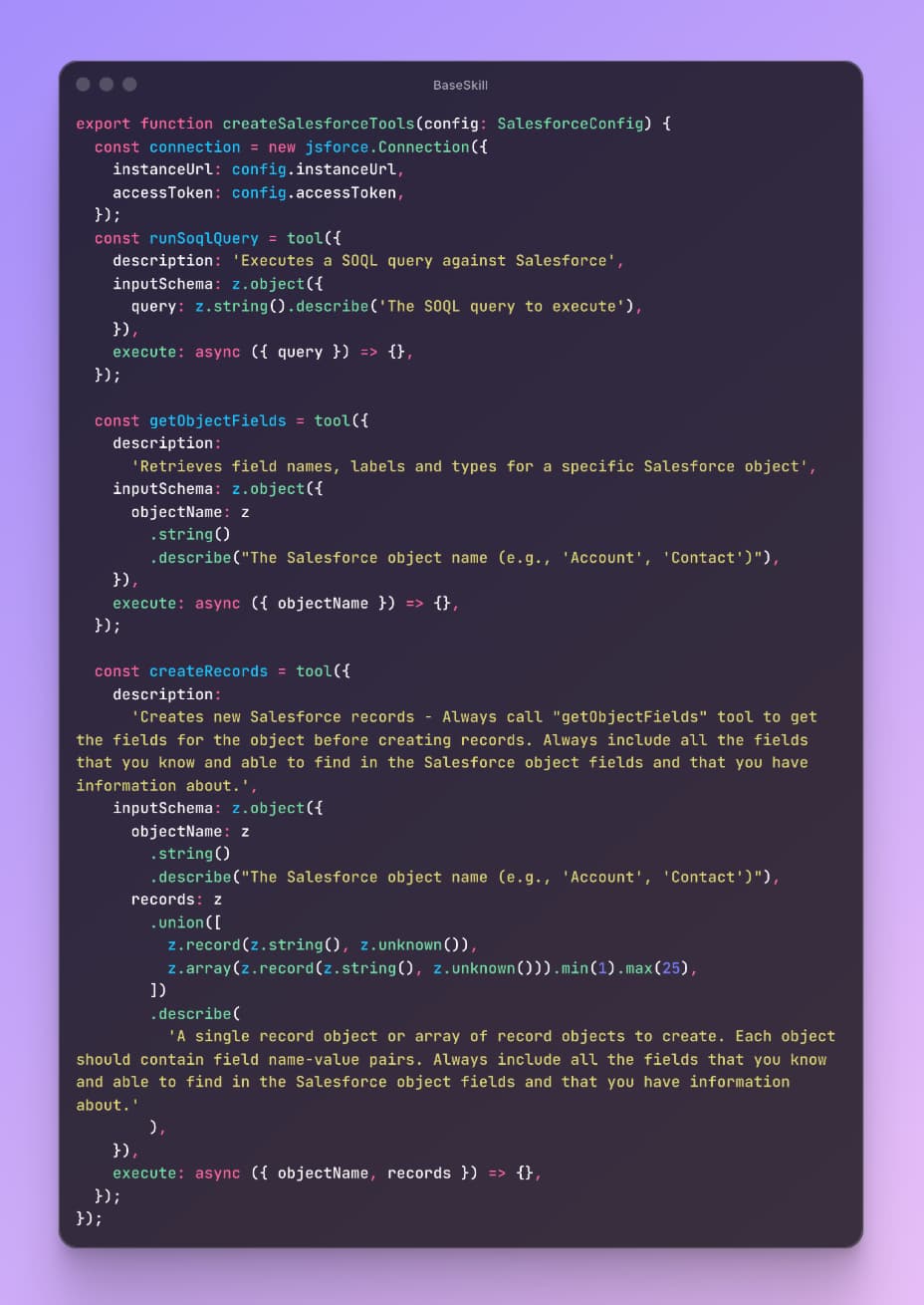
The breakthrough came when we stopped thinking about tools as API endpoints and started thinking about them as CLI commands.
Instead of registering a separate tool for every possible Salesforce operation - getSalesforceContact, updateSalesforceOpportunity, createSalesforceTask, querySalesforceReport (we had 10+ like this) - we compacted them into four:
- soql - Run any SOQL query (with validation and security inside the tool execution)
- getSchema - Get the schema for any Salesforce object
- createRecords - Create records of any type with a properties object and type
- editRecord - Edit any record by ID, type, and properties
That's it. The tool interface is loose (accepts flexible inputs) but scoped (each tool has a clear, bounded purpose). It's the same pattern as a good CLI: git doesn't have gitAddFile, gitAddDirectory, gitAddPatternMatch. It has git add with flags and arguments.
We applied this pattern across all our integrations. Our 6 internal tools collapsed into 2 action-oriented tools with properties that resemble CLI arguments. The MCPs followed suit.
The result: our system prompt dropped from ~100K tokens to 5K tokens - a 95%+ reduction. That 5K includes all tool definitions, instructions, and guardrails. Everything.
But the token savings, while dramatic, weren't even the biggest win. The real magic was in what happened to agent behavior. With fewer, cleaner tools to reason about, the model started making better decisions.
It stopped confusing similar tools. It stopped hallucinating parameters. It started composing tool calls more creatively because the primitives were simple enough to reason about combinatorially.
Dynamic Skill Loading: Feed On Demand
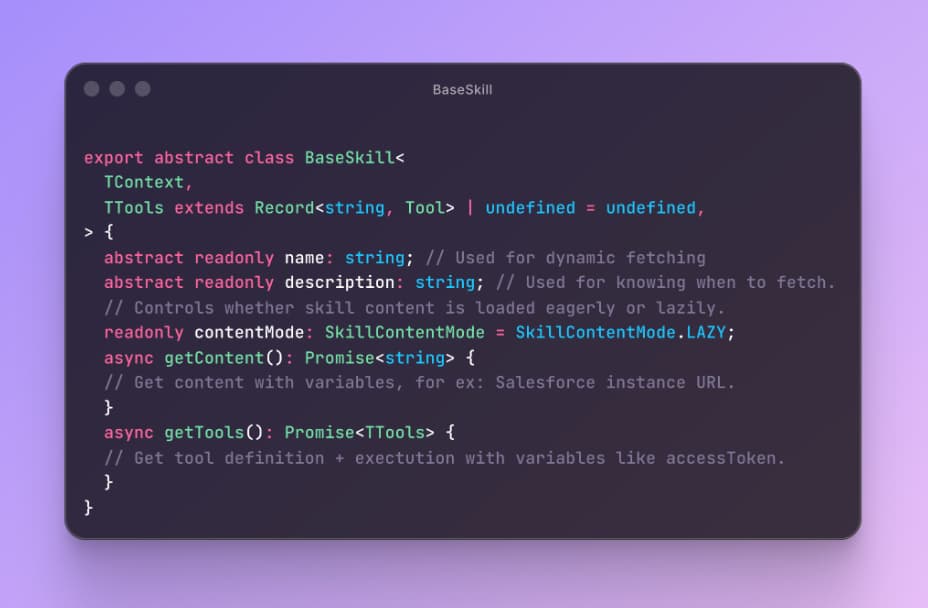
The second big insight was about when to feed the agent its context. Not everything needs to be in the prompt from the start.
We built a dynamic skill loading system inspired by the famous SKILL.md but that works without files and includes the actual tools. Here's how it works:
When the Lusha Agent encounters a task that requires a specific integration (say, Salesforce), it loads a skill (Content + Tools) by name - think of it as a recipe card. The skill contains the tool definitions, usage patterns, common gotchas, and relevant schema hints for that integration. Once loaded, those tools stay registered for the rest of the session.
If you've used Claude's skill system (their SKILL.md files), you've seen a version of this pattern. OpenClaw does something similar with their skill registry and ClawdHub - agents can discover, install, and load skills on demand. But OpenClaw takes it a step further: skills are composable Markdown files that the agent can not only load but author.
When OpenClaw encounters a task it doesn't have a skill for, it can write a new one - a workflow definition with guardrails and references - and slot it into its own registry. It's the logical extreme of dynamic loading: the agent doesn't just consume skills, it produces them. For enterprise use cases like ours that's too much autonomy, but the underlying architecture - skills as portable, self-contained capability packages - is the same pattern we landed on.
Manus and others use the file system as extended context, treating it as "unlimited, persistent, and directly operable" memory.
The shared principle across all three: don't pre-load everything. Load what you need, when you need it, and keep it loaded.
This matters for two reasons that go beyond simplicity:
First, KV-cache stability. As the Manus team emphasizes - and I cannot stress this enough - the KV-cache hit rate is probably the single most important metric for a production agent. With Claude Sonnet, cached tokens cost 10x less than uncached ones. Every time you change the prefix of your context, you invalidate the cache. If your tool definitions live at the front of the context (and they usually do), dynamically adding or removing tools mid-session is a cache-killer.
Our approach sidesteps this: we start with a minimal, stable tool set. When a skill loads, it appends to context. The prefix stays stable. The cache stays warm.
Second, cognitive load. A model with 4 tools and a loaded skill makes better decisions than a model with 60 tools, even if the total information is the same. Structure matters. Cognitive architecture matters. Feeding the model a firehose of tool definitions is like handing someone an entire encyclopedia when they asked for a recipe.
Errors Are Context, Not Bugs
Here's a counterintuitive lesson that all three of us - Manus, OpenClaw, and our team - converged on independently: keep the failures in the context.
When the agent calls the wrong API, gets an error response, or produces something the environment rejects, the natural instinct is to clean it up. Retry silently. Reset the state. Present a clean trace.
Don't do this.
At Lusha, we found that leaving failed actions and their error traces in the conversation history dramatically improved the agent's ability to self-correct. When the model sees that a SOQL query returned a MALFORMED_QUERY error, it doesn't just retry - it reasons about what went wrong and adjusts. It's not magic; it's in-context learning doing exactly what it's designed to do.
The Manus team puts it perfectly: "Erasing failure removes evidence. And without evidence, the model can't adapt." They consider error recovery one of the clearest indicators of true agentic behavior - and they're right. In our agent loops of 10-20 steps, errors are not the exception. They're a regular part of the flow. The agent that can recover is the agent that ships.
OpenClaw takes this further by separating memory into two layers: JSONL transcripts for raw factual history (every tool call, every error, every result) and Markdown files for summarized long-term knowledge. This dual-layer approach means the agent can reason over a compressed narrative of past sessions while still having access to the unfiltered audit trail when it needs to debug a failure. It's an elegant split - fast context from summaries, deep context from transcripts.
The practical implication: resist the urge to sanitize your agent's context. Errors are nutritious. Feed them back.
The File System Is Your Agent's Pantry
One pattern we saw across all three architectures - and adopted ourselves - is using persistent storage as extended context rather than trying to cram everything into the prompt window.
Manus treats their VM's file system as "the ultimate context: unlimited in size, persistent by nature, and directly operable by the agent itself." Their agent writes notes, intermediate results, and state to files, then reads them back when needed. Their famous todo.md pattern - where the agent rewrites a checklist after every step - is a clever trick to keep the current plan in the model's recent attention window.
OpenClaw stores configuration, memory, and skills in local Markdown files. Their architecture is described as "self-hackable" - the agent can modify its own skill definitions and memory on the fly. It's radical, and it comes with security implications (Kaspersky found 512 vulnerabilities in an early audit), but the principle is sound: external storage as cognitive scaffolding. OpenClaw's architecture also includes a Context Window Guard that monitors token count in real-time and triggers summarization before the window overflows - preventing the incoherent behavior that happens when models hit their limit mid-reasoning. Rather than trusting the agent to manage its own context budget, the infrastructure enforces it.
At Lusha, we use a similar approach for complex multi-step tasks. Rather than keeping every enrichment result, CRM record, and API response in the conversation context (which would blow past any reasonable window), we let the agent externalize intermediate state to the DB. The context keeps references - enough for the model to know where information is - while the full data lives outside the window, retrievable on demand.
This is what the Manus team calls "restorable compression": you can drop content from the context as long as the path back to it is preserved. It's the difference between carrying every book in your arms and knowing where the library is.
What This Means For You
If you're building agents right now, here's the condensed version of everything above:
Audit your token budget. Actually count how many tokens your tool definitions consume. If it's more than 10-15% of your context window, you have a feeding problem.
Think CLI, not REST. Instead of one tool per operation, design fewer tools with flexible inputs. Give the model composable primitives, not a thousand buttons.
Load skills dynamically. Don't pay the context cost for Salesforce tools when the user is asking about HubSpot. Load on demand, keep for the session.
Protect your KV-cache. Keep your context prefix stable. No timestamps at the start. No shuffling tool definitions. Append-only when possible.
Keep errors in context. Failed tool calls are training signal. Don't sanitize them away.
Externalize aggressively. Use files, databases, or any persistent store as extended memory. Keep references in-context, full data out-of-context.
The Feeding Metaphor, Revisited
Context engineering is still young - it's an emerging science. There's no textbook for this. No established best practices. Just teams around the world running their own "Stochastic Graduate Descent," learning from painful iterations what to feed their agents and what to withhold.
But the direction is clear. The models are getting better, faster, and cheaper. What's not getting commoditized is the skill of shaping the information environment around them. How you structure the context - what goes in, what stays out, what gets loaded dynamically, what gets externalized - that's what separates an agent that sort of works from one that actually ships.
At Lusha, we went from an agent drowning in 100K tokens of tool definitions to one running lean on 5K tokens that makes better decisions, costs less to run, and recovers gracefully from errors. The model didn't change. The feeding did.
Your agent isn't dumb. It's just hungry for the right things.

